
The PHP Security Crisis: Why It’s Time to Rethink How Your Business Website Is Built

This week, government websites in Finland and the Netherlands went dark, parts of Wikipedia went offline, and even BBC programme pages disappeared. The cause was not one hacked company. It was two critical flaws in PHP, the language that quietly runs a huge share of the world's business websites.
If your website runs on WordPress, WooCommerce, Magento, Joomla, Drupal or a custom PHP build, this affects you. Here is what happened, what to do today, and why it may be the right moment to rethink how your site is built.
What happened
Security researchers at Calif and Wiz used advanced AI models to find two critical vulnerabilities in PHP itself. According to the researchers, the flaws had gone unnoticed for more than a decade. Details leaked on social media on 20 October, before a full fix was ready, and the PHP Foundation released patches on the afternoon of 21 October.
The risk is serious. Europe's CERT-EU says the flaws could allow unauthenticated remote code execution, meaning an attacker could run their own code on your server without logging in. The US NSA warned that such flaws often give a direct path to a server's files and database. Cloudflare's CTO reported seeing early attacks within hours.
That is why the UK's NCSC, the NSA and agencies in the EU, Japan and Australia gave unusual advice: if you cannot patch now, take the site offline until you can.
Two details matter for business owners:
- CERT-EU says the issue may affect PHP versions going back to PHP 5 (2004).
- Patches were issued only for the latest PHP versions. Sites on PHP 8.1 or older are being told to upgrade, not just patch.
Why small and mid-sized businesses are most exposed
Large organisations have security teams patching overnight. Most business websites do not. They often sit on shared hosting, run an old PHP version nobody remembers choosing, and carry plugins last updated years ago.
As Sophos researcher Don Smith told the BBC, the hard part is not installing the patch. It is finding every place PHP is running, including control panels, plugins and third-party tools that never advertise it. Wiz estimates roughly 70% of the internet is affected, a figure the BBC could not verify.
For a business, a compromised site means more than downtime. It can mean stolen customer data, malware served to your visitors, Google warnings on your search listing, and lost leads during your busiest weeks.
Do this today, before anything else
Migration is a medium-term decision. Patching is an emergency. Start here:
- Find out if your site runs PHP. Ask your developer or hosting provider, or check your hosting control panel.
- Check your PHP version. If it is 8.1 or older, upgrade to a supported version, then apply the patch.
- Update your CMS, themes and plugins once your host has patched PHP.
- If you cannot patch quickly, follow official advice and take the site offline temporarily.
- Look for signs of a break-in: unknown admin users, unfamiliar files, or sudden redirects.
- Keep watching for updates from your host and plugin vendors over the coming weeks.
The bigger lesson: how your site is built decides how exposed it is
On a traditional PHP site, every visit runs code on your server. The page is assembled live, the database is right behind it, and the admin login sits on the same public address. When PHP has a flaw, every visitor's request is a possible way in.
A modern React-based site, built with frameworks like Next.js or Astro, can work very differently. Pages are pre-built and served as static files from a global CDN. Your content lives in a separate headless CMS that the public never touches. Forms and payments go through small, isolated services.
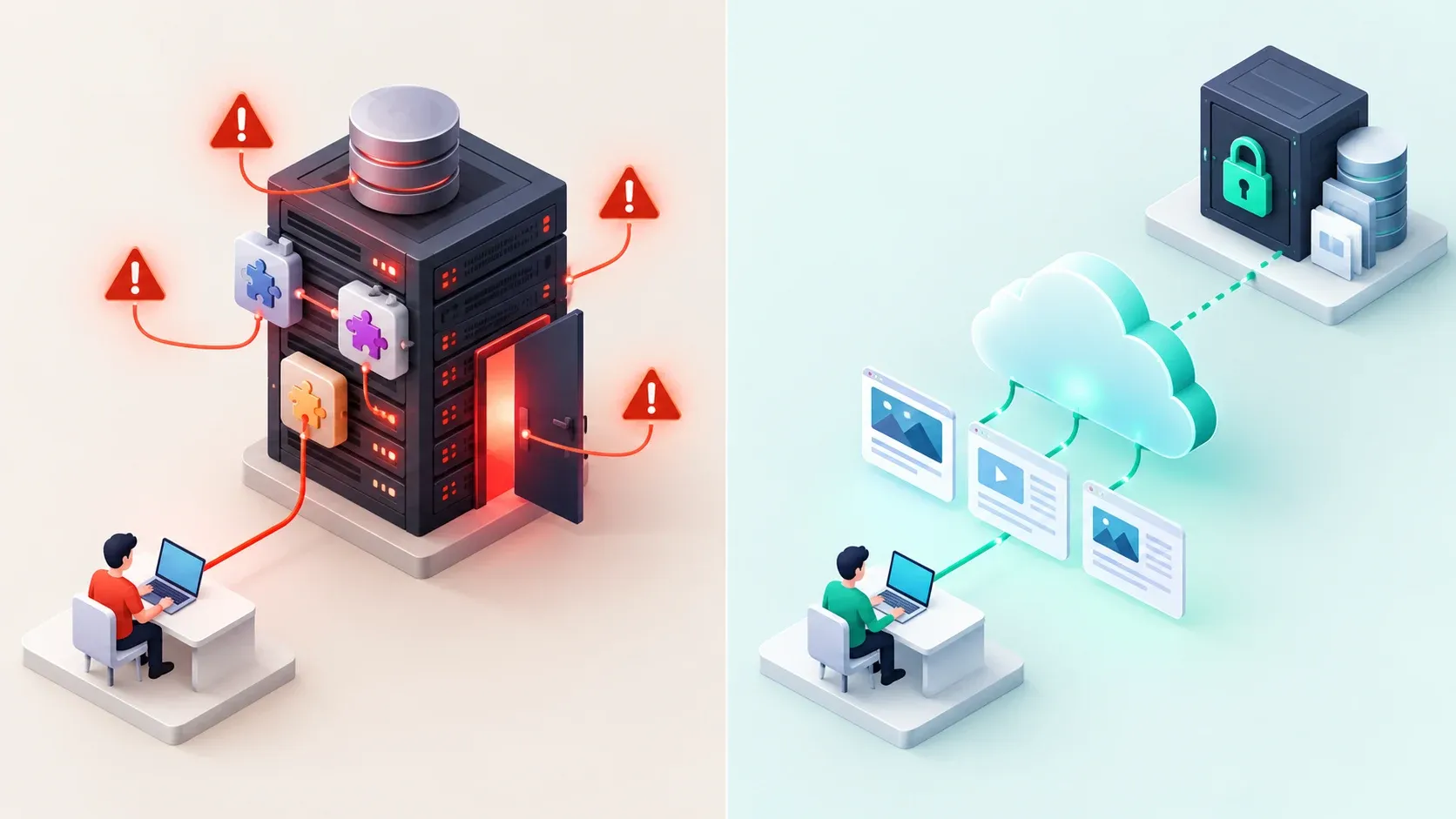
| Factor | Traditional PHP site | Modern React site (static or headless) |
|---|---|---|
| What runs when someone visits | PHP code on your server, every time | Mostly pre-built files from a CDN |
| Database exposure | Directly behind the public site | Separate, often not public at all |
| Admin login | Usually at /wp-admin on the same domain | On a separate CMS platform |
| Plugin risk | Dozens of third-party PHP plugins | Fewer moving parts, chosen deliberately |
| Speed | Slows as plugins pile up | Fast by default, good for SEO and Core Web Vitals |
| Scaling for traffic spikes | Server can buckle | CDN absorbs it |
The security benefit comes from a smaller attack surface, not from React itself. If there is almost nothing running on a public server, there is far less for the next vulnerability to hit.
An honest note: React is not a magic shield
No technology is immune. React apps with server-side features have had their own serious flaws, including a critical issue in React Server Components in late 2025. Any site with a server, in any language, needs updates and monitoring.
What changes with a well-planned modern stack is how much is exposed and how fast you can respond. A static site has little to attack. A headless setup keeps your content system off the public internet. And a smaller dependency list means fewer surprises when the next advisory lands. Anyone promising you a site that never needs maintenance is selling you something.
Should your business switch?
Switching makes the most sense if your site is mainly a showcase, lead-generation or content site, if it runs on an old PHP version or a heavy stack of plugins, or if speed and SEO already hold you back. If you rely deeply on WordPress for editing, a headless setup lets your team keep the familiar editor while the public site runs on React.
At Digitalbuddha, we treat a migration as a product, not a one-off rebuild. Our five-phase process keeps it low-risk:

- Discover: audit your current site, plugins, PHP version, SEO rankings and integrations.
- Design: plan the new architecture and keep what already works for your brand.
- Develop: rebuild in React with a headless CMS, preserving URLs and redirects so rankings carry over.
- Optimise: launch, measure speed and conversions, and fix what the data shows.
- Scale: add new pages, campaigns and automation without piling on risk.
And as always, you own everything: the code, the designs and the content. No lock-in.
Get a free PHP risk check
Not sure if your site is affected? Our team will check your PHP version, CMS and plugins, tell you what to patch now, and show you what a modern React site would look like for your business. No obligation.
Call +91 8594 00 10 10 or reach us at digitalbuddha.in.
Frequently Asked Questions
Is my website affected by the PHP vulnerabilities?
If your site runs on PHP, it may be. That includes WordPress, WooCommerce, Magento, Joomla, Drupal and custom PHP builds. Ask your developer or hosting provider, or check your hosting control panel, to confirm whether PHP is running and which version.
Which PHP versions need to be upgraded?
Patches were issued only for the latest PHP versions. If your site runs PHP 8.1 or older, you are being advised to upgrade to a supported version first, then apply the patch. CERT-EU says the issue may affect versions going back to PHP 5.
What should I do if I can’t patch my site right away?
Follow the official advice from agencies such as the UK’s NCSC and the NSA: take the site offline temporarily until you can patch it. A short outage is far cheaper than a compromised site.
How do I know if my site has been hacked?
Look for unknown admin users, unfamiliar files on the server, and sudden redirects to other sites. Google warnings on your search listing can also be a sign. If you see any of these, contact your developer or host immediately.
Is a React website completely safe from this kind of attack?
No. No technology is immune, and React apps with server-side features have had their own serious flaws. The advantage of a static or headless setup is a smaller attack surface: almost nothing runs on a public server, and the content system stays off the public internet.
Can I switch to React without losing my SEO rankings?
Yes, if the migration is planned properly. Preserving URLs and setting up redirects lets your rankings carry over. A good migration also audits your current SEO before anything is rebuilt.
Can my team keep using WordPress to edit content?
Yes. A headless setup lets your team keep the familiar WordPress editor while the public site runs on React. The CMS sits behind the scenes instead of on the public site.


Get In Touch With Us


Follow Us


